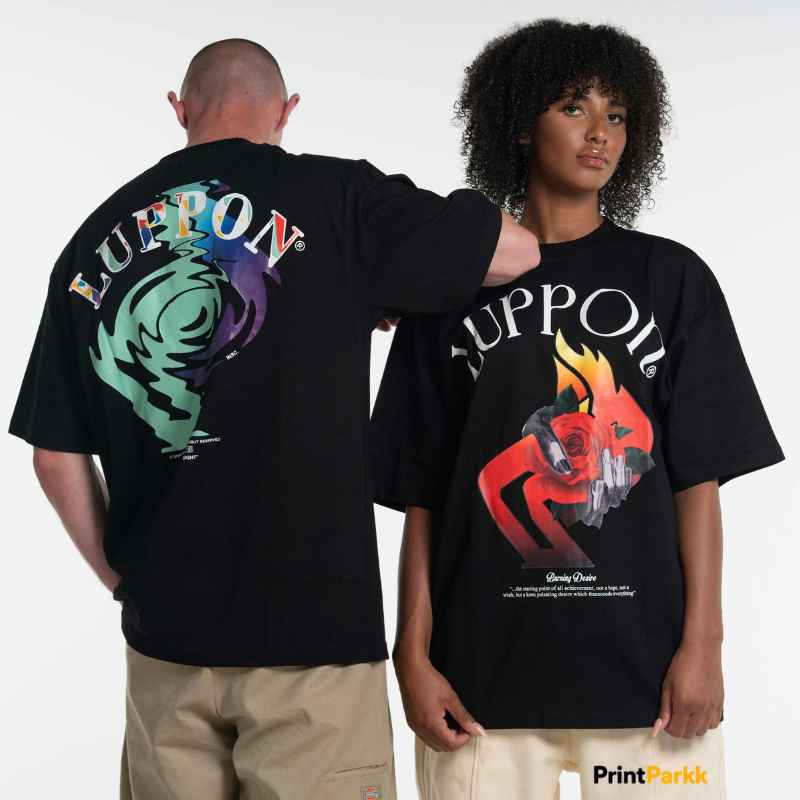

Creating a custom shirt or team jersey used to require hours of sketching, editing, and testing different layouts. In 2026, the best AI tools for custom T-shirt jersey design 2026 can help designers generate concepts faster—but the final quality still depends on human creativity, typography, print knowledge, and careful editing.
As a T-shirt designer, I use AI as a creative assistant rather than a complete replacement for professional design work. It helps me explore ideas, build mood boards, test visual directions, and develop concepts that I can refine into clean, printable artwork.
Why AI Matters for T-Shirt Design
AI design tools are useful when you need to create multiple concepts quickly. For example, a client may ask for a basketball jersey, a streetwear T-shirt, or a vintage graphic with only a few basic ideas.
With the right workflow, AI can help you:
- Generate initial design concepts.
- Explore color combinations.
- Test different illustration styles.
- Create visual references for clients.
- Develop mascot and sports-themed ideas.
- Build mockup concepts.
- Save time during the brainstorming stage.
However, AI-generated artwork often needs professional cleanup. Text may be misspelled, details may look distorted, and some graphics may not be suitable for screen printing or embroidery without additional editing.
My Favorite AI Tools for Custom T-Shirts
1. Midjourney for Creative Concepts
Midjourney is one of my favorite tools for generating bold visual directions. It works especially well for vintage illustrations, dramatic mascots, fantasy artwork, streetwear graphics, and expressive sports concepts.
I often use it when a client knows the mood they want but does not yet have a clear visual direction. A strong prompt can help me explore several ideas before I begin creating the final vector artwork.
For example, a prompt might describe:
- A roaring tiger mascot.
- A vintage collegiate style.
- Dark green, cream, and gold colors.
- Bold athletic lettering.
- A distressed screen-print texture.
- A front-facing jersey graphic.
I do not usually send the raw AI image directly to print. Instead, I use it as a starting point, then redraw important elements, correct the typography, simplify the colors, and prepare the final artwork in a professional design program.
2. Adobe Firefly for Brand-Friendly Edits
Adobe Firefly is helpful for generating and editing visual elements inside the Adobe ecosystem. It can support background creation, object variations, color exploration, and image adjustments.
For designers who already use Photoshop or Illustrator, Firefly can fit naturally into an existing workflow. I can use AI to test an idea and then complete the important production work manually.
This is particularly useful for:
- Creating presentation backgrounds.
- Exploring alternative color palettes.
- Generating supporting textures.
- Removing or replacing visual elements.
- Developing campaign imagery for a T-shirt launch.
For commercial projects, I always review the current licensing terms and confirm that the final artwork meets the client’s business requirements.
3. ChatGPT for Design Ideas and Prompts
ChatGPT is not a replacement for an illustration or vector application, but it is extremely useful during the planning stage. I use it to organize ideas, create design briefs, develop slogans, and write structured AI prompts.
For a custom jersey project, I may ask ChatGPT to help define:
- Target audience.
- Jersey theme.
- Brand personality.
- Recommended color palette.
- Lettering style.
- Front and back placement.
- Possible sleeve details.
- Short, memorable slogans.
A clear creative brief usually produces better results than a vague prompt. Instead of writing “make a cool shirt,” I might describe the audience, garment type, mood, colors, graphic subject, print method, and desired visual style.
4. Ideogram for Typography Experiments
Typography is one of the most important parts of a T-shirt or jersey design. Ideogram is useful for exploring concepts that include lettering, slogans, and poster-style compositions.
Although AI-generated text should still be checked carefully, the tool can help me visualize the general relationship between words and graphics. It is useful when I want to compare a bold athletic style with a retro script, condensed sans-serif, or hand-drawn look.
For final production, I prefer to recreate the lettering manually. This gives me full control over:
- Spacing.
- Letter shape.
- Alignment.
- Print size.
- Outline thickness.
- Front and back consistency.
5. Canva AI for Quick Layouts and Mockups
Canva is a practical option for beginners, small businesses, and creators who need simple promotional designs. Its AI features can help with layout ideas, social media graphics, presentations, and basic product visuals.
I would not use Canva alone for every professional jersey project, especially when the client needs a fully editable vector file. However, it can be helpful for:
- Creating quick concept boards.
- Preparing Pinterest graphics.
- Designing launch announcements.
- Testing simple shirt layouts.
- Presenting ideas to a non-designer client.
Canva is also useful after the main design is complete. I can place the finished artwork into promotional templates and quickly create content for social media or an online store.
My Recommended AI Design Workflow
AI works best when it supports a structured design process. My workflow usually looks like this:
Step 1: Understand the Brief
Before opening an AI tool, I identify the garment type, audience, purpose, colors, message, and production method.
A youth sports team jersey will need a different visual approach from a premium streetwear T-shirt. The design should match how and where the garment will be worn.
Step 2: Generate Several Directions
I create multiple concept directions instead of becoming attached to the first result. One concept may focus on typography, another on a mascot, and another on a badge or emblem.
This gives the client meaningful options and helps me discover which visual approach has the strongest potential.
Step 3: Select and Redraw
After choosing a direction, I redraw or rebuild the important elements. I correct awkward shapes, remove unnecessary detail, and make sure the design works at the actual print size.
This is where professional design judgment becomes essential. A beautiful image on a screen may not work well on fabric.
Step 4: Prepare Print-Ready Artwork
For most professional projects, I prepare clean vector or high-resolution files. Depending on the printer, the final package may include AI, EPS, SVG, PDF, or high-resolution PNG files.
I also check:
- Color mode.
- Transparent background.
- Resolution.
- Bleed and safe areas.
- Small details.
- Text accuracy.
- Front and back placement.
- Commercial usage requirements.
Step 5: Show a Realistic Mockup
A mockup helps the client understand how the design will look on an actual garment. I use it to review size, placement, contrast, and overall balance before delivering the final files.
Important Mistakes to Avoid
AI can make the early design stage faster, but it can also create problems if used without quality control.
Avoid these common mistakes:
- Using AI-generated text without checking spelling.
- Printing a detailed image that is too complex for the garment.
- Copying a recognizable logo, mascot, or copyrighted character.
- Using a low-resolution image as the final print file.
- Ignoring the difference between screen colors and printed colors.
- Sending a client an unedited AI image.
- Forgetting to confirm commercial usage rights.
- Designing without considering the shirt color.
I always recommend treating AI output as a draft. The final design should be reviewed, refined, and prepared specifically for the selected printing method.
AI Tools vs. Professional Custom Design
AI tools are excellent for speed and exploration, but custom design services provide more control and consistency. A professional designer can understand the client’s brand, adjust the artwork for production, and deliver organized files that are ready to use.
At Print Parkk, we focus on original custom T-shirt designs with printable files, commercial use options, and front-and-back design support. The website also features design categories such as anime, business, streetwear, animals, music, adventure, funny, and custom styles. Explore Print Parkk’s custom T-shirt design services.
The site explains that designs are created using Adobe Illustrator and Photoshop, with vector and source files available for suitable projects. Learn more about the design process.
How to Choose the Right AI Tool
The best tool depends on your goal:
| Your goal | Useful option |
|---|---|
| Create artistic concept directions | Midjourney |
| Edit and develop branded visuals | Adobe Firefly |
| Write briefs and creative prompts | ChatGPT |
| Explore lettering concepts | Ideogram |
| Create simple layouts and promotions | Canva AI |
For professional work, I rarely rely on only one platform. I may use ChatGPT to develop the brief, Midjourney to explore visual concepts, Illustrator to create the final vector artwork, and Photoshop or Canva to present the design in a realistic mockup.
Frequently Asked Questions About Best AI Tools for T-Shirt Jersey Design in 2026
What are the best AI tools for custom T-shirt jersey design in 2026?
Some useful options include Midjourney, Adobe Firefly, ChatGPT, Ideogram, and Canva AI. Each tool has a different purpose, so the best choice depends on whether you need concept art, typography ideas, editing, planning, or promotional layouts.
Can I print an AI-generated design directly on a T-shirt?
You can, but it is usually better to edit the image first. Check the spelling, remove visual errors, improve resolution, simplify overly complex details, and confirm that you have the necessary commercial usage rights.
Is AI good for sports jersey design?
Yes, AI is useful for exploring mascots, color schemes, badges, numbers, and athletic themes. However, jersey lettering, numbering, placement, and production specifications should be finalized manually for a professional result.
What file format is best for custom T-shirt printing?
Vector formats such as AI, EPS, SVG, and print-ready PDF are often preferred because they can be resized without losing quality. A high-resolution transparent PNG may also be useful, depending on the printing company and production method.
Will AI replace professional T-shirt designers?
I do not believe AI will replace designers who understand branding, typography, production, and customer communication. AI can speed up brainstorming, but human judgment is still needed to create original, practical, and print-ready designs.
Final Thoughts
The best AI tools for custom T-shirt jersey design 2026 can make the creative process faster and more flexible. I see them as powerful assistants for research, brainstorming, and visual exploration—not as a substitute for careful design decisions.
The strongest results come from combining AI-generated ideas with human editing, original artwork, accurate typography, and professional print preparation. When those elements work together, a simple concept can become a T-shirt or jersey that people genuinely want to wear.